Project Story
Introduction
Modern organizations generate enormous volumes of information through PDF reports, Word documents, spreadsheets, technical manuals, policies, contracts, and internal knowledge bases. Although this information is valuable, finding the right answer across hundreds or thousands of documents can be time-consuming.
Traditional document search relies primarily on keywords. While keyword search is useful for locating exact terms, it may struggle when employees ask questions using different wording from the original documents.
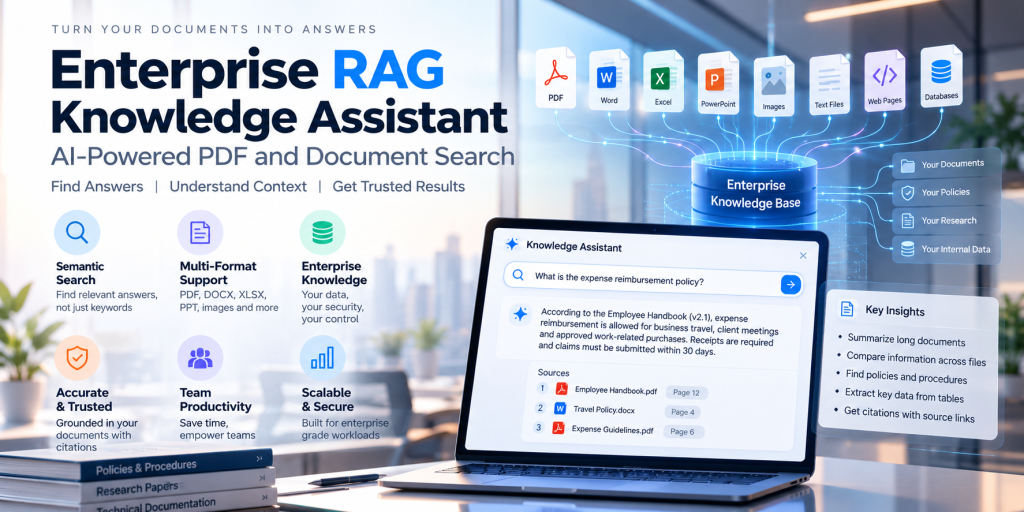
An enterprise RAG knowledge assistant offers another approach. It combines information retrieval with large language models (LLMs) to help users ask questions in natural language and receive answers grounded in relevant organizational documents.
At Yagyax Technologies LLP, we explore AI-powered knowledge retrieval solutions that combine document processing, semantic search, hybrid retrieval, intelligent reranking, and source-grounded answer generation.
This case study presents a reference architecture for building an enterprise knowledge assistant that can search PDFs and other business documents while supporting traceability, access control, and measurable quality evaluation.
Project scope: This is an illustrative solution architecture, not a report of a completed client deployment. No client-specific performance improvements or financial results are claimed.
The Business Challenge: Finding Answers Across Enterprise Documents
Imagine an organization maintaining thousands of documents across departments, including HR policies, product manuals, financial reports, operational procedures, and technical specifications.
An employee might ask:
- What is our vendor onboarding process?
- Which document describes the product warranty?
- What are the approval limits for a particular expense?
- What changed between the latest and previous policy versions?
- Which technical manual explains a specific error code?
Traditional search may return a list of documents, leaving employees to open files and locate the relevant passages themselves.
Common challenges include the following.
1. Keyword-based search limitations
A user may search for “employee travel reimbursement” while the relevant policy uses the phrase “business travel expense claims.”
Without suitable synonyms, semantic retrieval, or query expansion, exact keyword matching may fail to surface the most useful passage.
2. Complex PDF structures
Enterprise PDFs may contain multiple columns, tables, footnotes, scanned pages, diagrams, headers, and page numbers.
Extracting text without preserving document structure can separate important values from their labels or mix content from different sections.
3. Information distributed across multiple documents
Answering a question may require retrieving several passages from different documents, such as a policy, an exception document, and a supplementary procedure.
The system must identify relevant evidence and combine it carefully without losing the context.
4. Unsupported AI-generated answers
An LLM can generate a plausible response even when the retrieved evidence is incomplete. Enterprise applications therefore need grounding instructions, source attribution, and an appropriate abstention mechanism.
5. Security and document permissions
Not every employee should have access to every document. A knowledge assistant must enforce the organization’s existing authorization rules during retrieval, not merely hide unauthorized citations in the final response.
The Proposed Solution: A Retrieval-Augmented Generation Architecture
Retrieval-Augmented Generation, or RAG, connects a language model to an external knowledge source.
Instead of relying only on information learned during model training, the system retrieves relevant passages from approved documents and supplies them as context for generating an answer.
The proposed enterprise knowledge assistant follows two main workflows: document ingestion and question answering.
Architecture overview
Document sources → Parsing and extraction → Structure-aware chunking → Embedding generation → Search indexes → Hybrid retrieval → Reranking → LLM answer generation → Citations and response
The main components are described below.
1. Document ingestion and parsing
The ingestion pipeline accepts supported enterprise files, such as:
- PDF documents
- DOCX files
- TXT and Markdown files
- CSV and structured tabular data
- Scanned PDFs and image-based documents
A suitable parser extracts text and, where required, tables, page boundaries, headings, and image references.
For scanned PDFs, OCR may be required before the extracted text can be indexed.
The ingestion process should retain useful metadata, including:
- Document ID and title
- Department or business unit
- Page number
- Section heading
- Document version
- Creation or modification date
- Access-control attributes
For tables, preserve row and column relationships. For diagrams and images, consider OCR, image captions, or multimodal processing where the content is necessary to answer business questions.
Document parsing quality is critical: information that is incorrectly extracted or omitted cannot reliably be recovered by the downstream language model.
2. Structure-aware document chunking
Once a document is parsed, it must be divided into smaller passages called chunks.
Chunking determines the units of text that are embedded, indexed, retrieved, and passed to the LLM.
A chunk that is too small may lose important context. A chunk that is too large may contain unrelated information and consume unnecessary context-window capacity.
A practical strategy combines document structure with token-aware chunking.
Recommended chunking strategies
A. Heading-based chunking
Split documents according to titles, headings, and subheadings. This is useful for policies, technical documentation, and manuals with a clear hierarchy.
B. Token-based chunking
Set chunk sizes using the tokenizer appropriate to the downstream model. A starting experiment might compare chunks of approximately 400–800 tokens with modest overlap, but the best settings depend on the document type and evaluation results.
C. Table-aware chunking
Keep table headers with their associated rows. If a table is too large, split it into logical row groups while repeating the necessary column headings and preserving source references.
For example, an approval-limit table should retain the relationship between each employee role and its corresponding limit.
D. Page-aware chunking
Retain page metadata so that the assistant can identify the source page. Page boundaries can be preserved as metadata without forcing every chunk to contain an entire page.
E. Parent-child chunking
Index smaller passages for precise retrieval while retaining a larger parent section for additional context when generating an answer.
This can be particularly useful for technical documents and policies where a paragraph depends on surrounding definitions or exceptions.
F. Multimodal document handling
For scanned pages, charts, and diagrams, combine OCR with appropriate visual extraction methods. Do not assume that every PDF parser can reliably interpret tables or images.
Chunking strategy by document type
| Document type | Recommended approach |
|---|---|
| Policies and manuals | Heading-based, token-aware chunks |
| Financial reports | Section-aware chunks with table preservation |
| Scanned PDFs | OCR followed by structure-aware chunking |
| Technical specifications | Parent-child chunks with metadata |
| Large tables | Header-preserving row groups |
| Image-heavy reports | Text extraction plus selected visual processing |
The final chunking configuration should be chosen through a representative evaluation set rather than a universal chunk-size rule.
3. Embedding generation and vector indexing
After chunking, each text passage is converted into a numerical vector called an embedding.
Embeddings represent semantic characteristics of text and allow the system to retrieve passages that are conceptually similar to a query, even when the wording differs.
For example, the questions “How do I claim travel expenses?” and “What is the reimbursement procedure for business trips?” may express a similar intent.
An embedding model can help connect these queries to related document passages.
Choosing an embedding model
Model selection should consider:
- Retrieval quality on enterprise terminology
- Support for the languages used in documents
- Context length and input limits
- Embedding dimensions and storage requirements
- Inference latency and operating cost
- Deployment, privacy, and data-residency requirements
Potential technology choices include hosted embedding APIs or self-hosted models from the BGE and E5 model families. The appropriate model should be selected through comparative testing on representative enterprise questions.
Generated embeddings are stored in a vector index alongside chunk IDs and relevant metadata.
Possible vector storage choices include PostgreSQL with pgvector, OpenSearch, Qdrant, or Weaviate. The final selection depends on infrastructure, filtering requirements, scale, operational expertise, and integration needs.
4. Hybrid retrieval: Keyword search plus vector search
Pure semantic retrieval is not always sufficient for enterprise documents.
Queries containing invoice numbers, product codes, contract identifiers, error messages, or exact policy terminology may benefit from lexical matching.
The proposed architecture combines two retrieval methods.
Keyword retrieval
Uses lexical relevance techniques such as BM25 to find passages containing important query terms.
Vector retrieval
Uses embedding similarity to identify semantically related passages.
Both retrieval systems run against the same authorized document corpus. Their candidate lists are then combined using a rank-fusion method, such as Reciprocal Rank Fusion (RRF), or another evaluated fusion strategy.
For example, a query such as “What does error E1047 mean?” may require exact identifier matching, while “How can I resolve a failed payment?” may benefit from semantic retrieval.
Hybrid retrieval provides a practical way to balance exact-match precision and semantic flexibility.
Metadata filters can further restrict results by document version, department, date, or other permitted attributes.
5. Intelligent reranking
Hybrid retrieval can produce a candidate list containing both relevant and partially relevant passages.
A reranker evaluates the query and each candidate passage together to estimate which passages are most useful.
A cross-encoder reranker is one option: unlike a bi-encoder that independently embeds queries and documents, it evaluates their interaction directly.
A typical workflow is:
- Retrieve candidate passages using keyword and vector search.
- Merge and deduplicate the candidates.
- Apply a reranking model to prioritize relevant passages.
- Retain a suitable number of high-quality passages.
- Pass the selected context to the generation model.
Reranking can improve the ordering of retrieved evidence, but it adds computational cost and latency. Its benefit should be validated against a baseline that does not use reranking.
6. Grounded answer generation with source citations
After retrieval and reranking, the system constructs a prompt containing the user’s question and the selected evidence.
The language model generates an answer according to instructions such as:
- Answer using the supplied document evidence.
- Cite the source document and page or section where available.
- Do not invent missing policies, figures, or requirements.
- Distinguish explicit document statements from interpretations.
- State when the available evidence is insufficient.
- Identify conflicting information instead of silently choosing one version.
The response can include clickable source references that open the relevant document or page, subject to the user’s permissions.
Citations improve traceability, but their presence alone does not guarantee correctness. The system should also validate whether each citation supports the associated claim.
7. Enterprise access control and security
Security must be part of the retrieval architecture rather than an afterthought.
A production design should consider:
- Single sign-on and identity integration
- Role-based or attribute-based authorization
- Document-level access permissions
- Tenant isolation for multi-tenant environments
- Permission-aware retrieval filters
- Encryption in transit and at rest
- Audit logging and document access tracking
- Data retention and deletion policies
- Secure handling of sensitive content sent to external model providers
Authorization filters must be applied before restricted content reaches the generation model. Cached results must also respect the identity and permissions of the requesting user.
Retrieved documents should be treated as untrusted data. Instructions embedded in a PDF must not be allowed to override system policies or authorize unintended tool actions.
End-to-End Workflow
The solution can be divided into two independent but connected pipelines.
Document indexing pipeline
- Upload or discover a document.
- Validate the file and check access permissions.
- Extract text, tables, headings, and relevant page metadata.
- Run OCR or additional visual processing when needed.
- Create structure-aware chunks.
- Generate embeddings.
- Index the chunks in the keyword and vector search systems.
- Record the document version and ingestion status.
- Reindex updated documents and remove obsolete versions according to retention rules.
Question-answering pipeline
- Authenticate the user.
- Receive and normalize the query.
- Apply permitted metadata and access filters.
- Retrieve candidates using keyword and vector search.
- Fuse and rerank the results.
- Select evidence within the model’s context budget.
- Generate an answer grounded in the retrieved passages.
- Attach source citations and validate them.
- Return the response or abstain if evidence is insufficient.
- Record appropriate telemetry for monitoring and evaluation.
Separating ingestion from query processing allows documents to be indexed asynchronously while keeping question answering responsive.
Technology Stack for an Enterprise RAG Solution
The stack should be selected according to existing infrastructure and deployment requirements.
| Layer | Example technologies |
|---|---|
| Backend API | Python with FastAPI |
| Document parsing | PyMuPDF, suitable PDF/DOCX parsers, OCR tools |
| Orchestration | Custom Python pipeline, LangChain, or LlamaIndex |
| Embeddings | BGE, E5, or a hosted embedding model |
| Keyword retrieval | OpenSearch or Elasticsearch |
| Vector retrieval | pgvector, Qdrant, Weaviate, or OpenSearch |
| Reranking | Cross-encoder reranker |
| Language model | Hosted API or an appropriately deployed open-weight model |
| Authentication | Enterprise identity provider and authorization middleware |
| Monitoring | Structured logs, traces, latency metrics, and evaluation dashboards |
These are implementation options, not a claim that every technology must be used in the same deployment.
For organizations with an existing search platform, extending it with vector retrieval may be preferable to introducing a completely separate search infrastructure.
How to Evaluate an Enterprise RAG Knowledge Assistant
A convincing RAG implementation needs a repeatable evaluation process. Reviewing a handful of answers manually is not enough to establish production readiness.
Evaluation should cover retrieval quality, answer quality, security, and operational performance.
1. Build a representative test dataset
Create a set of questions based on actual document types and user tasks.
Include:
- Exact-match queries
- Synonyms and paraphrases
- Questions involving tables and numerical values
- Questions requiring multiple passages
- Queries about document versions
- Ambiguous questions
- Questions with no answer in the available corpus
- Queries that attempt to access restricted documents
For each test case, record the expected answer where appropriate, relevant source passages, and acceptable citations.
2. Measure retrieval quality
Recall@K
Measures the proportion of known relevant items retrieved within the first K results.
Precision@K
Measures the proportion of the first K results that are relevant.
Mean Reciprocal Rank (MRR)
Measures how highly the first relevant result appears.
Normalized Discounted Cumulative Gain (NDCG)
Evaluates ranking quality when relevance judgments have multiple grades.
These metrics help compare keyword-only retrieval, vector-only retrieval, hybrid retrieval, and hybrid retrieval with reranking.
3. Measure answer quality
Faithfulness: Are the generated claims supported by the retrieved context?
Answer relevance: Does the response answer the user’s actual question?
Context precision: How much of the retrieved context is relevant?
Context recall: Did retrieval find the evidence needed to answer the question?
Citation correctness: Do the cited pages or passages actually support the answer?
Frameworks such as Ragas can help automate portions of RAG evaluation. Automated scores should be complemented by human review, especially for financial, legal, medical, and other high-impact content.
4. Measure operational performance
Monitor:
- End-to-end response latency, including p95 and p99
- Document ingestion success and failure rates
- Indexing freshness
- Model and embedding costs
- Search errors and timeouts
- Cache behavior
- Rate limits and concurrency
- Unauthorized access attempts
5. Compare against a baseline
Start with the existing search system or a simple keyword-based baseline. Evaluate successive improvements independently:
- Keyword retrieval
- Vector retrieval
- Hybrid retrieval
- Hybrid retrieval with reranking
- Grounded answer generation with citations
This process helps identify which components improve quality and which introduce unnecessary cost or latency.
No performance or business uplift should be claimed until the evaluation has been run on representative data.
Common Challenges and How to Address Them
Incorrect PDF extraction
Challenge: Text extraction loses reading order or misinterprets tables.
Approach: Use layout-aware parsing, table extraction, OCR when necessary, and a document-level quality check before indexing.
Poor chunk boundaries
Challenge: Retrieved passages omit definitions or separate table values from their headings.
Approach: Use structure-aware chunking, preserve metadata, and test parent-child retrieval where additional context is needed.
Weak semantic retrieval
Challenge: The embedding model does not understand specialized terminology or abbreviations.
Approach: Compare candidate models using domain-specific questions and relevance judgments. Add query normalization or domain-specific vocabulary handling when justified.
Hallucinated answers
Challenge: The model generates claims that are not supported by retrieved passages.
Approach: Use explicit grounding instructions, citation validation, insufficient-evidence detection, and targeted evaluation of unsupported claims.
Stale or conflicting information
Challenge: Multiple document versions contain different rules.
Approach: Track version metadata, define document authority and freshness policies, and expose conflicting sources when the correct answer cannot be determined safely.
High latency or operating cost
Challenge: OCR, embedding generation, vector retrieval, reranking, and LLM inference can add up.
Approach: Process documents asynchronously, cache appropriate results, tune candidate counts, benchmark models, and apply reranking only where it provides sufficient value.
Business Applications of an Enterprise Knowledge Assistant
A RAG-based assistant can support multiple departments, depending on the available data and authorization model.
Human resources: Search employee handbooks, leave policies, benefits documentation, and onboarding guides.
Customer support: Retrieve troubleshooting instructions, product manuals, and approved support procedures.
Finance and operations: Locate internal procedures, expense policies, reporting definitions, and approval rules.
Legal and compliance: Find relevant clauses, policies, and regulatory documentation, with suitable review and access controls.
Engineering: Search technical documentation, incident reports, system runbooks, and architecture decisions.
Sales and business development: Retrieve approved product information, proposals, service descriptions, and internal playbooks.
For high-impact decisions, the assistant should support human verification rather than replacing the responsible professional.
Expected Outcomes and Success Criteria
The business value of an enterprise RAG assistant depends on the quality of the source documents, retrieval accuracy, user experience, security requirements, and the tasks being automated.
Rather than promising unverified improvements, define success criteria before implementation.
Potential goals include:
- More relevant document passages appearing near the top of search results
- Answers with verifiable source citations
- Fewer unsupported responses
- Reliable enforcement of document access permissions
- Acceptable response latency and operating cost
- Reduced time spent locating information, measured through a pilot or user study
- A maintainable ingestion process for document updates
The actual outcome should be established through a baseline comparison, a representative test set, and a controlled pilot.
Conclusion
Enterprise knowledge is only useful when people can find and apply it reliably.
A RAG-based knowledge assistant can connect organizational PDFs, reports, policies, and technical documents to a natural-language interface. By combining document-aware parsing, carefully designed chunking, embeddings, hybrid retrieval, intelligent reranking, and grounded answer generation, organizations can build a more capable approach to internal knowledge discovery.
However, the quality of the solution depends on more than the choice of LLM. Document extraction, retrieval evaluation, source attribution, access control, and ongoing monitoring are equally important.
Yagyax Technologies LLP helps businesses explore AI-powered search, retrieval-augmented generation, document intelligence, and scalable software solutions.
Looking to Build an Enterprise RAG Knowledge Assistant?
Whether you want to search thousands of PDFs, improve internal knowledge discovery, or build an AI assistant around your proprietary documents, the right architecture starts with your data, users, security requirements, and measurable business goals.
Contact Yagyax Technologies LLP to discuss your enterprise RAG, document search, or AI knowledge assistant project.